Overview
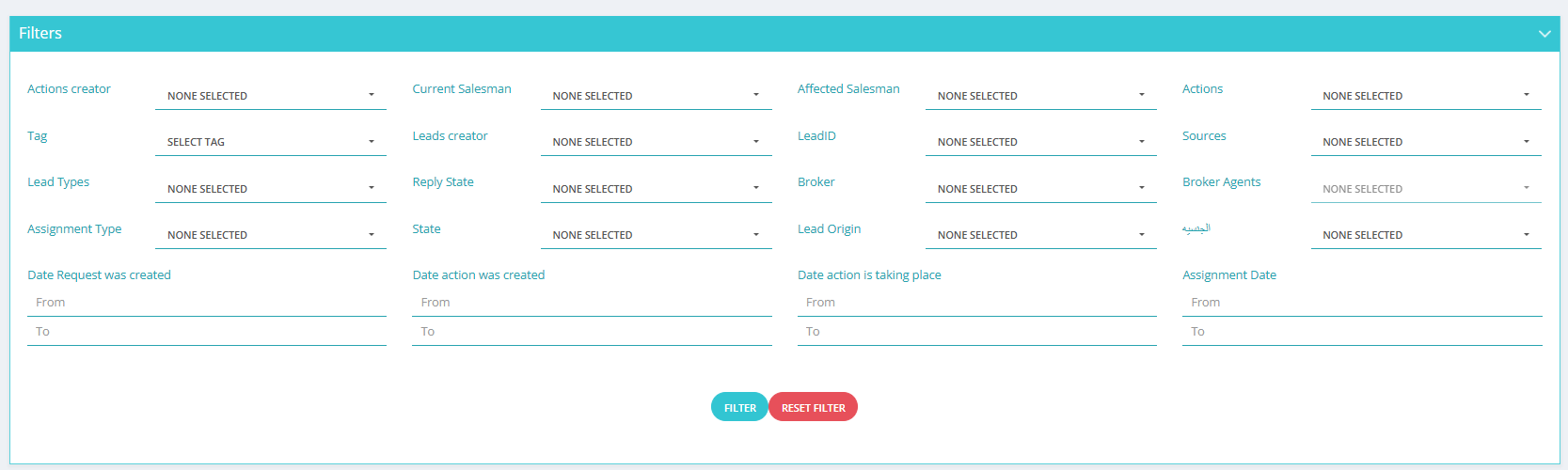
The Leads Actions Filter system provides comprehensive filtering and audit capabilities for analyzing every action performed within your lead management workflow. This powerful tool enables detailed tracking, analysis, and reporting of all lead-related activities, ensuring complete transparency and accountability in your sales process while supporting data-driven optimization strategies.
System Performance Metrics
Filter Categories
Comprehensive filter options
Audit Accuracy
Complete activity tracking
Filter Efficiency
Query optimization rate
Core Filter Categories
👥 Personnel & Assignment Filters
Actions Creator
Filter actions by the user who performed or created the action on a lead. Essential for tracking individual performance and accountability.
Current Salesman
Filter by the salesperson currently responsible for the lead. Critical for workload distribution analysis and current responsibility tracking.
Affected Salesman
Show actions that have impacted or involved a specific salesman. Useful for cross-team collaboration analysis.
Leads Creator
Filter by the user who originally created the lead. Important for source attribution and initial quality assessment.
⚡ Action & Activity Filters
Actions
Filter by the type of action performed (call, meeting, update, note). Essential for activity pattern analysis and workflow optimization.
Tag
Filter actions by custom tags for advanced segmentation and tracking. Enables specialized workflow categorization.
Reply State
Filter by the reply status of the lead (replied, not replied, pending). Critical for engagement tracking and follow-up optimization.
State
Filter by the current status of the lead (New, Contacted, Closed). Fundamental for pipeline stage analysis.
🏢 Lead Identification & Classification
Lead ID
Search for actions related to specific leads using their unique IDs. Essential for detailed individual lead analysis.
Lead Types
Filter by the type of lead (individual, company, broker). Important for segmented analysis and targeted strategies.
Lead Origin
Identify how the lead entered the system (website, referral, campaign). Critical for source effectiveness analysis.
Nationality
Filter actions by the nationality of the lead. Useful for geographic and cultural analysis of engagement patterns.
📈 Source & Campaign Tracking
Sources
Filter by the source from which the lead was acquired (website, referral, campaign). Essential for ROI analysis and source optimization.
Assignment Type
Filter by how the lead was assigned (manual, automatic, round-robin). Important for distribution strategy analysis.
🤝 Broker Network Filters
Broker
Filter actions related to a specific broker. Critical for broker performance analysis and relationship management.
Broker Agents
Filter actions involving particular broker agents. Essential for detailed broker network performance tracking.
📅 Time-Based & Date Filters
Date Request Created
Filter actions by the date the lead's request was created, using a date range. Essential for timeline analysis and trend identification.
Date Action Created
Filter by the date an action was created on the lead. Critical for activity timeline analysis and response time measurement.
Date Action Execution
Filter by the scheduled date for a specific action or event. Important for future planning and scheduling analysis.
Assignment Date
Filter by the date the lead was assigned to a user or team. Essential for workload distribution timeline analysis.
Complete Action Audit System
The Leads Actions Filter system provides unprecedented visibility into every aspect of your lead management workflow. With over 20 comprehensive filter categories, this system ensures complete accountability, enables detailed performance analysis, and supports strategic decision-making through comprehensive action tracking and audit capabilities.
Advanced Analysis Capabilities
Performance Analytics
- Individual performance tracking
- Team productivity analysis
- Response time measurements
- Conversion rate correlation
- Activity pattern identification
- Efficiency optimization insights
Compliance & Audit
- Complete action tracking
- Audit trail maintenance
- Regulatory compliance support
- Data integrity verification
- Change history tracking
- Security access logging
Strategic Insights
- Source effectiveness analysis
- Campaign performance tracking
- Workflow optimization
- Resource allocation insights
- Trend identification
- Predictive analytics support
Quality Control
- Action quality assessment
- Process compliance monitoring
- Standard adherence tracking
- Best practice identification
- Error pattern detection
- Improvement recommendations
Visual Guide
Best Practices for Action Filtering
Strategic Filter Utilization: Combine multiple filters to create comprehensive analysis views. Use time-based filters for trend analysis, personnel filters for performance evaluation, and action type filters for workflow optimization. Regular filtering analysis provides insights for continuous improvement.
Critical: Data Accuracy & Integrity
Filter Precision Alert: Ensure accurate filter application to maintain data integrity in reports and analysis. Verify filter combinations produce expected results and regularly audit filter usage to maintain system accuracy and reliability in decision-making processes.
Integration Benefits
The Leads Actions Filter system integrates seamlessly with reporting tools, analytics dashboards, and performance management systems. This comprehensive filtering capability ensures that every action within your lead management process is trackable, analyzable, and optimizable, providing the foundation for data-driven improvements and strategic decision-making across your entire sales operation.